
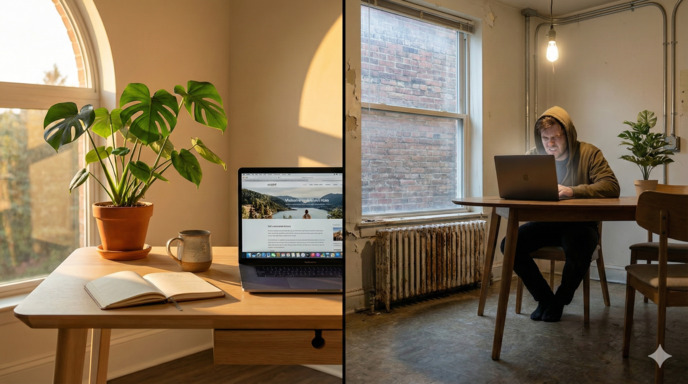
That sun-drenched loft in Medellin looks like a productivity oasis, but if the workspace is optimized for Instagram rather than focus, your deep work sessions will collapse by day three. Learning to audit listing photos for “attention friction” is the only way to avoid losing half your workday to constant physical readjustments.
The 4-Hour Focus Tax: What Airbnb Photos Don’t Show
On Day 1 of your new stay, the novelty carries you. You set up your laptop on that sleek, minimalist table and feel like a high-performer. But by Day 3, the “4-Hour Focus Tax” kicks in. You realize that the table is two inches too high, the chair has zero lumbar support, and the beautiful window creates a blinding glare on your screen at 10:00 AM.
The result? Instead of four hours of uninterrupted deep work, you spend your morning in “fidget cycles”—shifting every 15 minutes to find a comfortable angle, checking your phone during the micro-breaks caused by discomfort, and eventually giving up to find a coworking space. You haven’t just lost comfort; you’ve lost the most valuable hours of your day to preventable friction.
Key Insight: Listings optimized for Instagram aesthetics often hide friction points that interrupt deep work every 20 minutes. If you can’t see the ergonomic utility in the photo, it likely doesn’t exist.
The Visual Audit Protocol: How to “Read” a Listing
Professional Airbnb photographers are trained to hide flaws. Your job is to find them. Follow this 4-step visual scan before looking at the price or the reviews:
- The Anchor Check: Find the photo of the workspace. If there isn’t one, the host doesn’t consider it a feature. If it’s only shown from a distance, assume the chair is non-ergonomic.
- The Horizon Line: Compare the table height to the nearby sofa or bed. If the table is significantly higher than the sofa cushions, it’s a dining table (usually too high for 8-hour typing).
- The Perimeter Scan: Look at the floor. Are there cables visible? If not, the outlets are likely hidden behind heavy furniture or simply non-existent near the desk.
- The Reflection Test: Look at the TV or window reflections. It tells you where the primary light sources are and if they will bounce off your laptop screen during your “deep work” block.
Decoding the “Visual Red Flags” of Inadequate Workspaces
Use this table to estimate the attention-drain potential of any listing based on visual evidence:
| Feature | The “Pretty” Trap | The Focus Signal | Attention Cost |
|---|---|---|---|
| Seating | Metal stools or “ghost” chairs | Full-back support; padded seats | High (20-min fidget cycle) |
| Table Depth | Narrow consoles or bar counters | At least 20 inches of depth | Medium (Cramped wrist fatigue) |
| Lighting | Direct sunlight on the desk | Diffuse light; visible curtains | High (Visual fatigue/screen glare) |
| Power Access | No outlets visible near the desk | Outlets at desk or floor level | Low (Cable management friction) |
| WiFi Source | No router visible in any photo | Router in work room or hallway | High (Potential for signal drops) |
| Desk Clutter | Heavy “lifestyle” styling (vases/books) | Clean, clear surface | Medium (Setup/teardown friction) |
| Noise Sources | Desk next to fridge or street window | Desk in a dedicated nook or corner | High (Context switching from noise) |
| Material Storage | Zero shelving or nearby surfaces | Shelves or side tables available | Medium (Desk becomes a dump zone) |
Your Pre-Booking Workspace Scorecard
Use this scorecard to quantify the risk. If a listing scores low, you are pre-scheduling lost productivity.
| Checkpoint | How to Verify | Pass (1pt) | Fail (0pt) | Notes |
|---|---|---|---|---|
| Full Back Support | Chair back reaches shoulder blades | Yes | No | Essential for 4h+ blocks |
| Forearm Space | 10″+ clear depth in front of laptop | Yes | No | Prevents wrist strain |
| Direct Power | Outlet visible within 3 feet | Yes | No | Avoids messy cables |
| Anti-Glare | Desk is perpendicular to windows | Yes | No | Protects visual attention |
| Router Proximity | Visible in the same/adjacent room | Yes | No | Guarantees Zoom stability |
| Knee Clearance | Empty space under the desk surface | Yes | No | No drawers blocking legs |
| Surface Type | Wood/Laminate (not glass) | Yes | No | Glass is a mouse/sensor killer |
| Social Buffer | Desk is 10ft+ from main entrance | Yes | No | Minimizes “doorbell” interruptions |
Scoring Interpretation:
- 7-8 points: Book with confidence.
- 4-6 points: High risk. Use the questions below.
- Less than 4 points: Skip. You will spend more time fixing the room than working.
The Power of the Specific Inquiry
Use these tactical questions to protect your attention from an unverified host:
- “Could you share a photo of the power outlets near the work table?”
- “Does the window near the desk have blackout curtains or blinds?”
- “Is the chair shown in the photo the one currently at the desk?”
- “Can you confirm the desk height in centimeters or inches?”
- “Is there a secondary table or shelf nearby for materials?”
- “Where is the WiFi router located relative to the workspace?”
- “Are there any major construction projects on your street right now?”
The 48-Hour Mitigation Protocol
Already booked? Use these strategies to reclaim your focus blocks:
- The Chair Hack: Use sofa cushions for height and a rolled towel for lumbar support.
- The Screen Elevator: Use hardback books or an ironing board as a temporary standing desk.
- Glare Management: Pin a dark bedsheet over windows during high-glare hours.
- The Strategic Escape: Identify a 4.5-star coworking space within 2 hours of arrival as a backup.
Frequently Asked Questions
Should I message the host about workspace concerns before booking?
Yes, especially if the scorecard shows 4-6 points. Hosts who respond with specific measurements or additional photos are signaling transparency. Vague answers like “it’s very comfortable” are red flags that the workspace is inadequate for extended focus sessions.
What if the listing has great reviews but no dedicated workspace photos?
Read reviews specifically mentioning “work” or “laptop.” If reviewers stayed 1-2 nights for leisure, their assessment of workspace viability is unreliable. Look for reviews from guests who stayed 7+ days and mention productivity or remote work.
Can I request a workspace upgrade after I arrive?
You can ask, but hosts rarely have backup ergonomic chairs on hand. The 48-hour mitigation protocol is more reliable than hoping for furniture swaps. If the workspace is truly unusable, document it immediately and request a partial refund or early checkout through Airbnb’s resolution center.
How do I evaluate workspace quality for listings with only 1-2 reviews?
Use the visual audit protocol and scorecard exclusively—you can’t rely on review volume. Send the tactical inquiry questions to the host and evaluate response quality. Detailed, specific answers with photos indicate a workspace-aware host even if they’re new to the platform.
Is a coworking space membership worth it if the Airbnb workspace fails?
Calculate the time cost. If commuting to a coworking space takes 40+ minutes daily, you lose 3+ hours per week. A failed workspace costs you 4 hours of focus daily. In most cases, the coworking commute is still less expensive in time than fighting a bad home setup.
What’s the most commonly overlooked workspace issue in Airbnb listings?
Lighting direction. Hosts prioritize natural light for aesthetic appeal, but desks placed facing or directly beside windows create glare issues for 4-6 hours daily. Always check window placement relative to the desk in photos, and ask about curtain or blind options.
Do “laptop-friendly workspace” tags in listings guarantee quality?
No. This tag is self-reported by hosts and often means “there’s a table somewhere.” Use the visual audit protocol and scorecard instead. A listing without the tag but with a visible office chair and proper desk setup scores higher than a tagged listing with only a dining table.
This analysis focuses on time investment and workflow efficiency for productivity tools. It does not provide financial, career, health, or life planning advice. See our Disclaimer for content scope.
Analysis by

Decision science researcher focusing on second-order effects and the time-based economics of technology. Expert in workflow optimization and cognitive load management.